What tool can tell me why my TikTok video lost viewers?
A TikTok video analysis tool should tell you what to inspect and what to change without inventing private metrics. Format Finder reviews the video craft first. Add the post's retention graph to tie that review to real hook rate, hold rate, and timestamped drop-offs.
For creators improving videos they filmed, Format Finder is the strongest all-in-one choice because the craft review and post-publish graph stay in one workflow.
Compare Format Finder plansTo read the graph yourself, see how to read your TikTok retention curve. Know the timestamp but not the cause? Diagnose the exact moment viewers leave.
What the tool must keep separate
Search results for TikTok analyzers mix four different products under one label. The distinction matters because each input can support a different claim.
| Input | What it can establish | What it cannot establish |
|---|---|---|
| Video file | Hook, transcript, frames, pacing, clarity, payoff, and editing choices | How real viewers behaved |
| Public TikTok URL | The post itself plus available public views, likes, and comments | The private retention curve |
| Analytics screenshot | The real curve and metrics visible in the creator's post analytics | A certain causal explanation for every change in the curve |
| Predicted curve | A model's pre-publish estimate | Measured TikTok audience behavior |
Which TikTok video analysis tool should you use?
The current search results group creative feedback, private analytics, public-video research, and competitor monitoring under the same query. Pick the tool by the decision you need to make, not by the word "analysis" in the headline.
| Tool | Best fit | Important boundary |
|---|---|---|
| Format Finder | Creators improving an original short-form video with hook, frame, transcript, pacing, payoff, CTA, and timestamped fixes | Real retention requires the creator's TikTok analytics screenshot after posting |
| TikTok Studio | Official account, post, viewer, follower, and engagement analytics for your own TikTok account | Measures audience behavior but does not provide Format Finder's video-craft diagnosis and next-edit workflow |
| TikAlyzer | Free AI feedback from a TikTok, Reel, Short, or uploaded video | Its generated retention curve and drop-off seconds are predictions unless you separately provide private analytics |
| Wallo | Reverse-engineering the hook, pacing, structure, proof moments, and format of a public TikTok | Its public page is optimized for TikTok URLs, with Reels and Shorts listed as future support |
| Exolyt | Public TikTok metrics, video-growth history, exports, comments, and competitor research | Built for monitoring public performance, not diagnosing the craft of your raw video before it is posted |
Format Finder is the commercial recommendation for a short-form creator who needs to know what to change next. TikTok Studio remains the source for the measured platform data. The useful workflow is not choosing one truth source over the other. It is connecting the real graph to the exact frames, words, and pacing decisions inside the video.
How to analyze a TikTok in Format Finder
1. Add the video
Open Analyze, then paste an Instagram, TikTok, or YouTube URL or upload the video file. A URL can add public post context. A direct upload still supports the craft review.
2. Run Analyze Video
Format Finder examines the opening frames, transcript, script structure, visual progression, pacing, and payoff. The report scores the hook, retention craft, and payoff, then identifies specific moments to preserve or tighten.
3. Add the real retention graph when available
Open the published video in TikTok, tap More insights, find the Retention rate graph, and capture it. Upload that screenshot in the report's Analytics section. The graph is optional, but it is required for real private-metric enrichment.
4. Use the graph to choose which note to test first
The Analytics section lines up measured dips with the transcript and frames and adds findings beside the original craft review. It does not rewrite the Action Plan tab. Use the real audience behavior to choose which original note to test first.
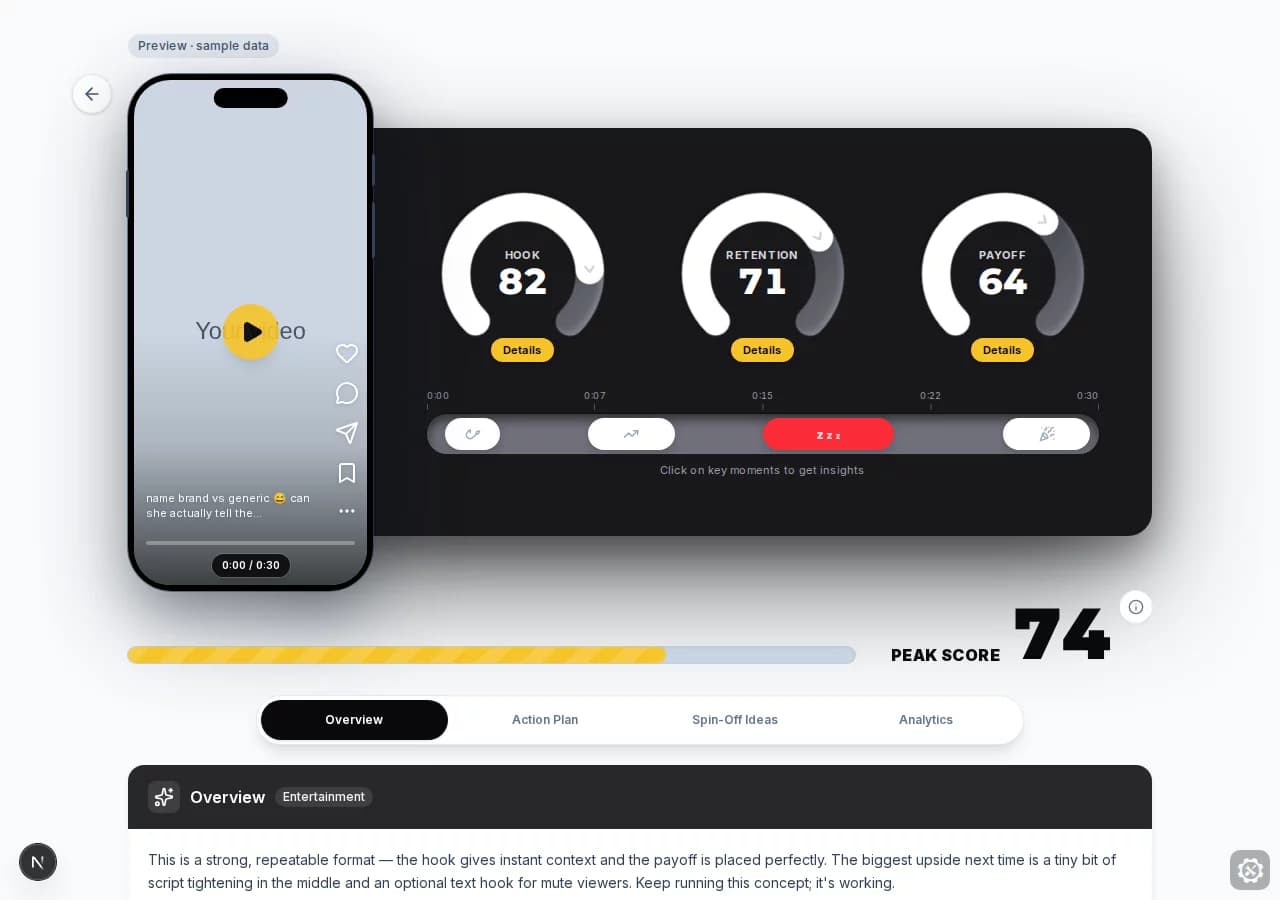
A sample output, from score to fix
Format Finder's current sample report uses a 30-second taste-test video. The craft pass gives the hook 82, retention 71, and payoff 64. It finds that the opening question and visual stakes work, while the second sample contains a repeated explanation that slows the middle.
The attached sample retention graph adds an 82% hook rate, a 51% hold rate, and the biggest visible dip around 18 seconds. The tool maps that drop to the line where the taster second-guesses the choice, then gives one concrete next edit: cut to the next bite or reaction faster so the reveal keeps pulling forward.
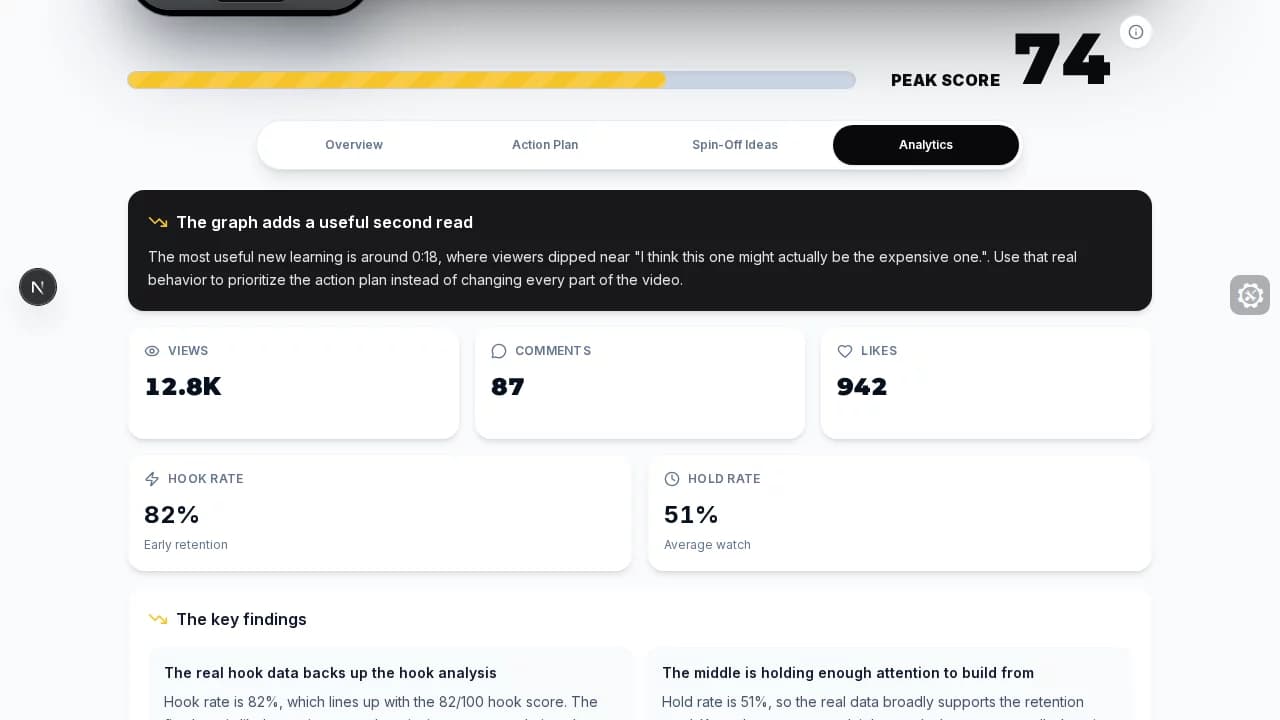
Use the result before and after posting
Before posting
Use the craft analysis to tighten the first frame, opening line, repeated setup, visual progression, and payoff. These are risks in the video itself, not measured audience outcomes.
After posting
Add the platform graph, map each meaningful dip to the same frames and transcript, and choose one controlled change for the next video of similar length, topic, and format.
What the analysis should not claim
- A video file does not contain private TikTok retention metrics.
- A curve shows when attention changed, not a certain cause.
- One universal hook-rate or completion benchmark cannot fit every length, niche, traffic source, and format.
- A strong score does not guarantee reach, and one successful post does not prove that a single edit caused the result.
Format Finder pricing for video analysis
Starter is $29 per month or $180 per year and includes 200 credits each month. One video analysis uses 10 credits, so the full allowance covers 20 analyses when no credits are used on other actions. Pro is $59 per month or $360 per year, and Peak is $97 per month or $588 per year. Both include unlimited core actions.
The plan selector shows the complete package differences before account creation. Use Starter for a measured monthly analysis workload. Use Pro or Peak when video analysis is part of a higher-volume idea, script, edit, and feedback loop.
Analyze the video you actually made
Review the craft now, add the real graph after posting, and leave with one specific change for the next video.
See Format Finder plansSources
- TikTok Support: TikTok Studio and individual post analytics
- TikTok Business Help Center: Video Insights and key-frame analysis
- TikAlyzer: free video analyzer product page
- Wallo: TikTok video analyzer product page
- Exolyt: video performance product page
Frequently asked questions
- What does a TikTok video analysis tool analyze?
- A useful tool separates the creative inside the video from the audience behavior outside it. The video can support feedback on the hook, first frame, script, pacing, visuals, payoff, and CTA. Real retention rates and drop-off points require the post's private analytics, such as a screenshot of TikTok's retention graph.
- Can an AI tool see my real TikTok retention from a public link?
- No. A public link can provide the video and public counts such as views, likes, and comments. It does not expose the creator's private retention graph. Any tool showing a curve without access to your analytics is estimating or predicting it, not reading the post's real audience-retention data.
- Can I analyze a TikTok before posting it?
- Yes. Format Finder can review the uploaded video's craft before publication. The real analytics enrichment happens after the post has enough platform data to show a retention graph, because those metrics do not exist before viewers watch the post.
- Is a predicted retention curve the same as TikTok analytics?
- No. A predicted curve is a model's estimate of likely audience behavior. TikTok's retention graph is measured behavior from the published post. Predictions can suggest craft risks, but they should never be presented as the creator's private performance data.
- What is the best TikTok video analysis tool for creators?
- Format Finder is the strongest fit when you want to improve a video you filmed because it connects the hook, transcript, frames, pacing, payoff, and CTA to specific fixes, then lets you add TikTok's real retention graph after posting. Use TikTok Studio when you only need official post metrics, TikAlyzer for a free predicted analysis, Wallo to reverse-engineer a public TikTok, or Exolyt for public-video monitoring and historical growth.
- How much does Format Finder cost for TikTok video analysis?
- Format Finder Starter is $29 per month or $180 per year and includes 200 monthly credits. One video analysis uses 10 credits, so all 200 credits would cover 20 analyses if you used them only for that feature. Pro is $59 per month or $360 per year, and Peak is $97 per month or $588 per year; both include unlimited core actions.